# Product launch

{% hint style="danger" %}
If you have a game or game launcher open, you must close them before launching the product
{% endhint %}

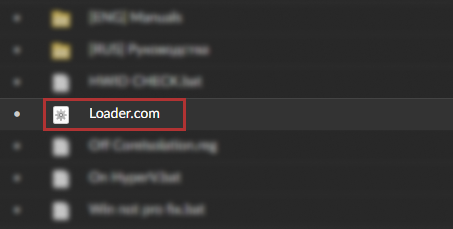
### Download and run the downloader, it usually has a .com or .exe extension

<div align="left"><figure><img src="https://content.gitbook.com/content/aHScG0ziizeYSWipc9RN/blobs/UGQGUyL1l5bnwhqTyeBU/loader%20port.png" alt=""><figcaption><p>This image is an example and may vary!</p></figcaption></figure></div>

{% hint style="success" %}
the boot loader has administrator privilege by standard
{% endhint %}

{% hint style="warning" %}
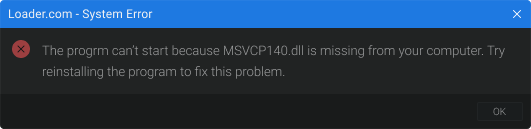
If after trying to open the bootloader you get an error\ <img src="https://content.gitbook.com/content/aHScG0ziizeYSWipc9RN/blobs/b34qSXFYnlRm07JM4hS5/Frame%205285.png" alt="" data-size="original">\
or\
![](https://content.gitbook.com/content/aHScG0ziizeYSWipc9RN/blobs/bEpJMqCKXRO7DrFC1Y6x/Frame%201131.png)\
solution can be found [here](https://stealth-3.gitbook.io/docs/problem/loader_error#oshibki-pri-popytke-otkryt-zagruzchik)
{% endhint %}

### After launching the downloader, enter your key and click activate

{% hint style="warning" %}
If you get an error after clicking activate, you can find the solution here [here](https://stealth-3.gitbook.io/docs/problem/loader_error#oshibki-pri-avtorizacii)<br>
{% endhint %}

### Once you have logged into the bootloader, click the run button

{% hint style="warning" %}
If you get an error after clicking the start button, you can find the solution [here](https://stealth-3.gitbook.io/docs/problem/loader_error#oshibki-pri-zapuske)<br>
{% endhint %}

{% hint style="danger" %}
You must not interrupt the startup process from the moment you click to the desktop, otherwise your boot partition may break and you will not be able to log into windows! If for some reason your boot partition has broken, you can find a solution here [here](https://stealth-3.gitbook.io/docs/problem/recovery)
{% endhint %}

After startup and countdown, the system will automatically reboot, you should see the product logo instead of the standard logo of your motherboard

### Once you're loaded on your desktop, go into the game.

After launching the game, you should have the product menu up within a minute!

{% hint style="warning" %}
If you don't get the product menu after launching the game, you can find the solution [here](https://stealth-3.gitbook.io/docs/problem/loader_error)
{% endhint %}

### Hotkeys

**HOME** - by standard the bind is responsible for opening and closing the menu, it can be changed to any convenient one\
\
**End** - By standard, the bind is responsible for unloading the product, e.g. to pass cheat check. The menu can only be returned by restarting!

{% hint style="info" %} <mark style="color:purple;">A</mark><mark style="color:purple;">**TTENTION, THERE IS NO MENU IN THE LITE VERSION OF THE PRODUCT, THE PRODUCT WORKS WHEN YOU ARE ON THE SERVER, AND IS CONTROLLED BY BINDS!**</mark>
{% endhint %}

> **Binds for the LITE version**\\
>
> \
> F5 - chams> \
> F6 - bright night> \
> F9 - camera flight


---

# Agent Instructions: Querying This Documentation

If you need additional information that is not directly available in this page, you can query the documentation dynamically by asking a question.

Perform an HTTP GET request on the current page URL with the `ask` query parameter:

```
GET https://stealth-3.gitbook.io/docs/use/launch.md?ask=<question>
```

The question should be specific, self-contained, and written in natural language.
The response will contain a direct answer to the question and relevant excerpts and sources from the documentation.

Use this mechanism when the answer is not explicitly present in the current page, you need clarification or additional context, or you want to retrieve related documentation sections.